Consuming a Web Service in ABAP

Consuming a Web Service in ABAP

This is a continued part of earlier article.

In this exercise we will find how we can consume a Web Service using ABAP by creating Proxy Class and Configure Logical Port.

Author : Ajay

Author's Website | Articles from Ajay

Ajay is a Functional Consultant in Supply Chain Management. He is a SAP Certified SCM APO consultant and ABAP Developer. He is also involved in SAP implementations, Migration and Support activities as a Consultant. Follow me on Facebook

Let’s start:
In this exercise we will look at how we can consume a web service using a client proxy with ABAP.
Why do we need a Web service Client Proxy :

  1. Webservice Client Proxy acts as transfer program.
  2. It is used to  connect to Server of the required Web Service
  3. Creation of Valid SOAP messages and evaluation of received responses is taken care by the proxy.
So developer can concentrate on the Business Application without bothering about the technical aspects, that is how the SOAP messages are exchanged.

CREATE PROXY CLASS :
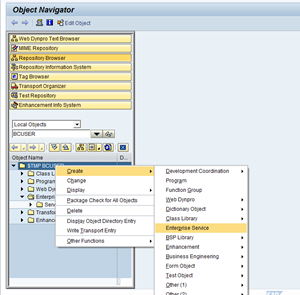
Step 1:  To start the Service Wizard again, from SE80 right click and choose Create->Enterprise Service.
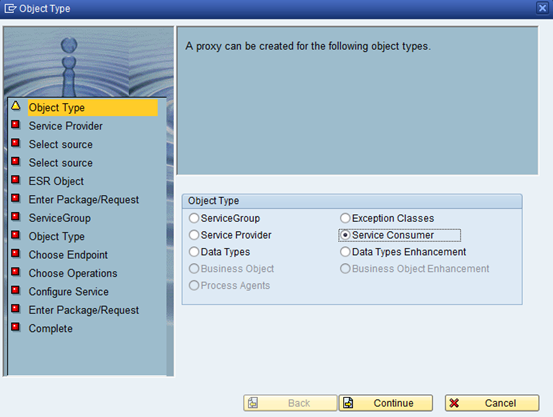
Step 2 : This time in the Object Type step of the Service Wizard, choose Service Consumer .
As we are at consumer site.

Step 3:
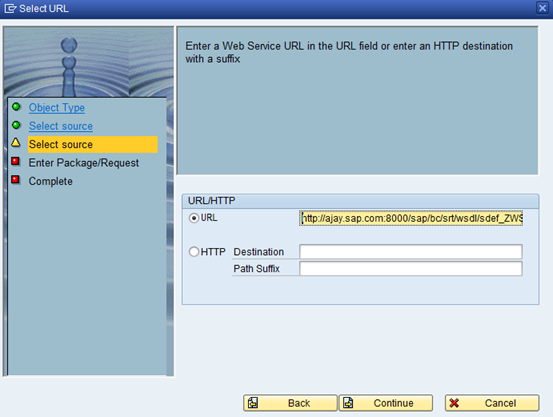
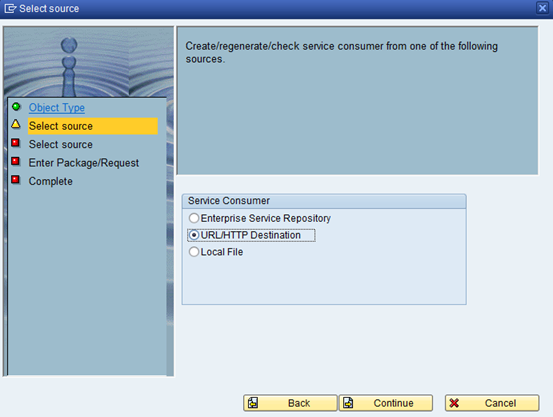
For the source of the Service  Consumer, you can choose between the Enterprise Service Repository, a URL to a WSDL or the local file location of a WSDL, a UDDI, and the Service Registry. Please choose URL/HTTP Destination.
Step 4: Enter the URL of WSDL file which we had created in earlier exercise.

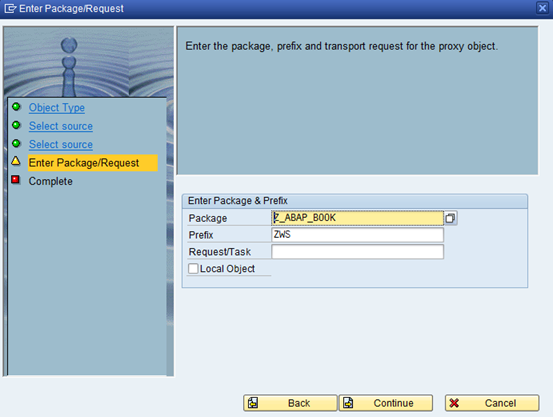
Step 5: Fill in the necessary details in the wizard.
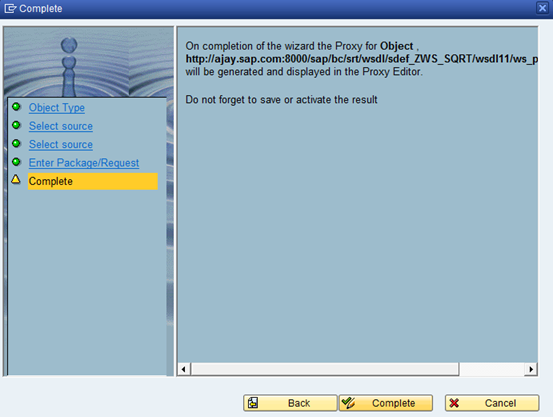
Step 6: On the final step, you can press Complete to start the Proxy object generation.
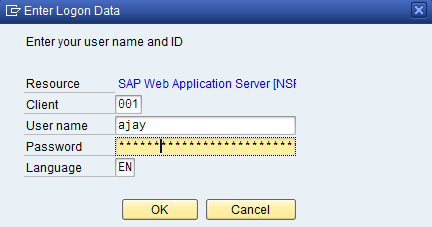
Step 7 : You will be promoted for your logon User name and Password.
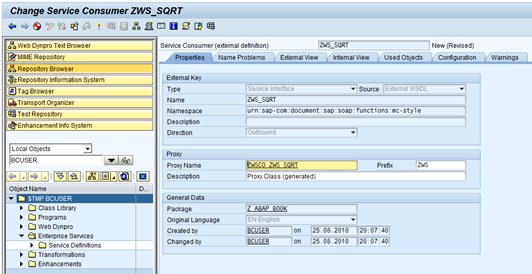
The generated proxy class is now displayed. Click on save and activate.
SET UP LOGICAL PORT
Go back to transaction SOAMANAGER and in order to setup a Logical Port for our new Service Provider.

Logical Ports are used to configure runtime features of a web service.
We can create a logical port by either tcode LPCONFIG(obsolete) or Soamanager as show below.

Why do we need a Logical port:
A consumer proxy never stores any details regarding the URl server which are specific one system.

These details need to be configured through logical ports and endpoints.
For example:When you transport a proxy class from a development system to production. The proxy class doesn’t hold any information about in which server the webservice needs to be called.  Logical port takes care of this.

Step :1

Go back to transaction SOAMANAGER and in order to setup a Logical Port for our new Service Provider.

We will navigate to the same location as the last exercise – the Service Administration tab and the click the link named Single Service Administration.

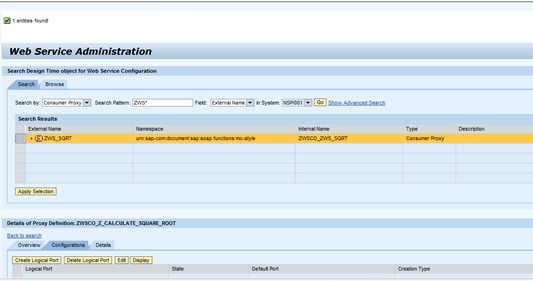
This time when you search in the Web Service Administration, choose to Search by Consumer Proxy. Don’t forget to press the Apply Selection button after highlighting your proxy.

From the Configurations tab, choose Create Logical Port.

Step :2
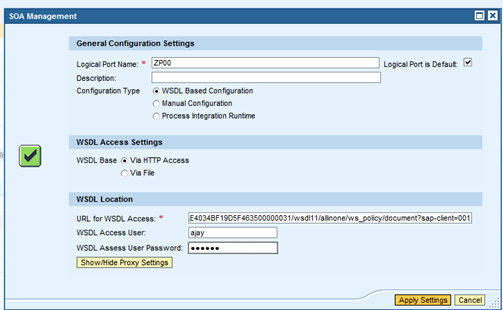
From the Popup screen that is generated, you will have to fill in several parameters. First you will need to name your logical port and set it as the Default. Next we need to use WSDL Based Configuration. This way the application will read all the necessary security settings for calling this service directly from the WSDL definition. Finally you will again need to supply the WSDL URL for the services you are call (hopefully you still left that browser window open). You also must supply your system User name and Password to access the WSDL.
Step :4

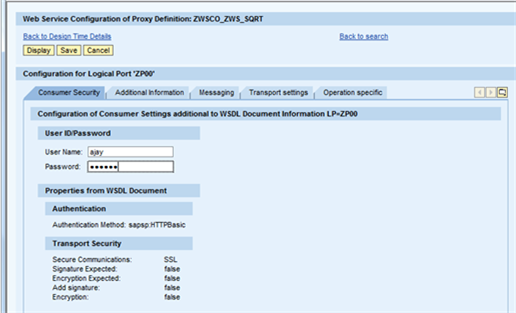
If successful, you will be returned to the Configuration for Logical Port screen. From here you can further define the settings for this logical port. For now we need to embed user credentials for calling this Enterprise Service. So once again input your User name and Password and then Save the Logical Port.
TESTING
You can now return to the ABAP workbench in the package ZPROXIES and the definition of your Service Consumer and test it.
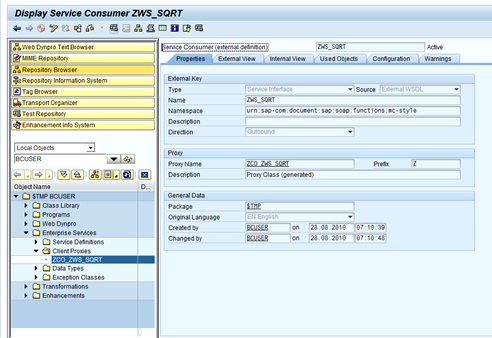
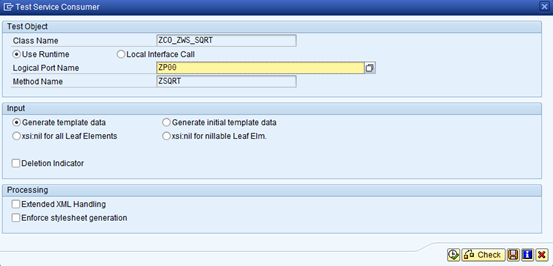
On the Test Service Consumer options dialog , choose ZSQRT Method Name. Finally execute the test.
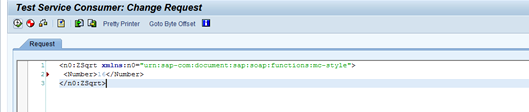
Switch to the XML Editor and replace the number value with 16. You can go ahead and execute the request call.
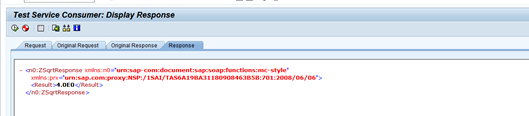
The response should show the XML version of the squareroot
Now what, If you want to consume web service using ABAP.

Goto SE80 and create a new report program ZPW_WEBSERVICE.
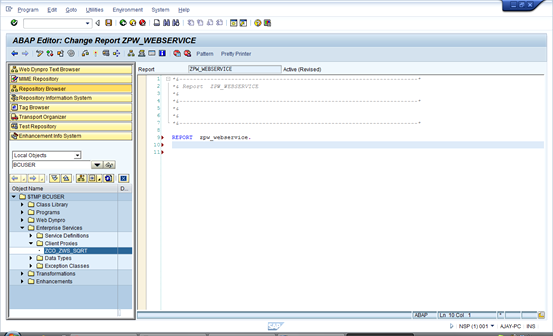
Drag and Drop the proxy class  ZCO_ZWS_SQRT and you get the template for consuming. This looks like as shown below.
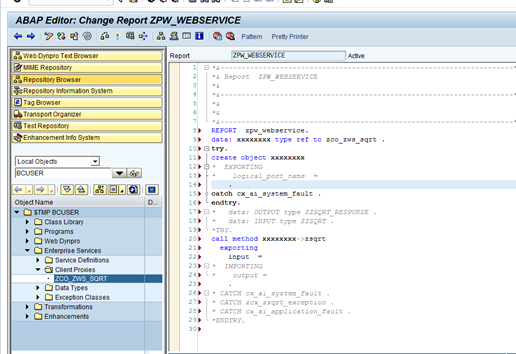
Modify the template for invoking the web service with the below code.

REPORT zpw_webservice.
DATA: proxy TYPE REF TO zco_zws_sqrt .
DATA : output TYPE zzsqrt_response .
DATA : input TYPE zzsqrt .
input-number = ‘1212′.
TRY.
CREATE OBJECT proxy
EXPORTING
logical_port_name = ‘ZP00′.
CATCH cx_ai_system_fault .
ENDTRY.
TRY.
CALL METHOD proxy->zsqrt
EXPORTING
input = input
IMPORTING
output = output.
CATCH cx_ai_system_fault .
CATCH zcx_zsqrt_exception .
CATCH cx_ai_application_fault .
ENDTRY.
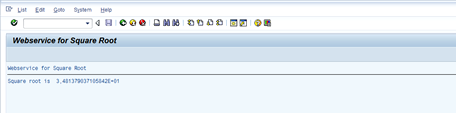
WRITE : ‘Square root is’ , output-result.
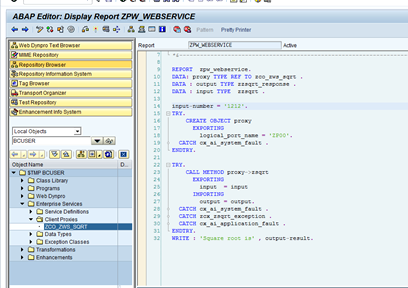
Now its ready for execution. Here we go.

Obviously its not the best kind of report to build, but I hope the basics fundamentals for consuming a web service would be clear by now.


RELATED POST

Create webservice


Like this post? Share it!

  • Tweet
  • Facebook
  • Diggit
  • Delicious
  • Diggit
  • Diggit
  • Diggit
  • Diggit
  • Diggit

ADVERTISE HERE


User Comments


  1. Dipankar Biswas
    November 27, 2010

    This is a great sample solution. Do you have one where you can publish a Function module as a web service, so that outside application can consume sap services ?
    Thanks,
    Dipankar

    Reply


  2. Rodrigo Fuentes
    January 10, 2011

    Hello Ajay your article is very usefull to work with and i want to thanks for share this kind of information.
     
    Recently i create my own function module and i publishes through a ESB (BEA Aqualogic)
     
    Then this WS is available from one of the deploy servers of the ESB.
     
    The problem is when i try to use the URL where the service is deployed SAP always show a 404 error, because cannot recha the HTTP destination wich use a virtual host…
     
    Do you kno how to solve this?
     
    Thank you very much!

    Reply


    • admin
      January 14, 2011

      Hi,
      Its clear that the webservice URL is not accessible .
      Have you verified all your settings on SICF?
      Is that you are facing this problem in a particular browser only?

      Thanks
      Ajay

      Reply


  3. Sreejith SP
    February 2, 2011

    Hi,
    The logical port created are not part of the transport request? I have created a logical port in my dev system and hoped that it would also go to quality and production systems along with the consumer proxy classes. Do we need to create the logical port manually in all of these systems?
     
    Thanks
    Sreejith

    Reply


    • Ajay
      February 2, 2011

      Hi Sreejith,
      You are correct.
      Logical ports are not transported ,you have to create them manually in each of these target systems.
      Because logical Ports are used to configure runtime features of a web service and any details regarding URL server which are specific to one system are never stored in the Consumer Proxy.

      Let me know if you need any other clarification.
      Cheers
      Ajay
      ajay@sapignite.com

      Reply


  4. Jose
    March 30, 2011

    Hello Ajay,

    Nice tutorial.
    Just a question, what’s the main diference between consuming a web service using this ABAP proxy tutorial, for creating on PI/XI system the SAP to SOAP scenario.

    Thanks!

    Reply


    • admin
      April 1, 2011

      Hi Jose,
      You can submit http request to call a webservice
      In case of ABAP proxy u r calling a method of proxy class
      The PI system handles all conversion .
      At last both handles SOAP.

      Thanks
      Ajay

      Reply


  5. Frank
    April 5, 2011

    Hi Ajay, 

    when using the wizard to generate a web service I find 3 options to create a consumer service. The second one is URL/HTTP-Destination.  When choosing this one, the field for the URL is restricted to 256 characters. Is there any chance to use longer URLs (via alias or so)?
    Thanks in advance,

    Frank

    Reply


  6. Hajira
    April 22, 2011

    Hi Ajay,
    Tutorial was very helpful ,but i dont have soa manager in sap as it is not the latest version ,can u please suggest me some other way to consume a webservice.
     

    Reply


    • admin
      April 24, 2011

      Hi Arun,
      You can use LPCONFIG for setting up the logical port. Rest of steps being the same.

      Thanks
      Ajay

      Reply


  7. hajeera
    May 16, 2011

    Hello Ajay,

    To consume a dot net web service do we hav to create same kind of webservice in sap.

    Regards,
    Hajeera

    Reply


    • admin
      May 16, 2011

      Yes.. Its the same across all the platforms.

      Cheers
      Ajay

      Reply


  8. lp
    July 7, 2011

    Hi Ajay,

    Is there any way that we can push the records fetched by web service to PSA instead of creating a ABAP program? So that it can be loaded into datatarget?
    Thanks.

    Reply


    • Ajay
      July 7, 2011

      Hi lp,
      Yes you can do that as well.
      Please check the following link which provided you step by step detail for the same
      Realtime Time Data Aquisition

      Cheers
      Ajay

      Reply


      • lp
        July 8, 2011

        Hi Ajay,
        Thank you.
        We are trying to extract data from MS Sharepoint into SAP BI using sharepoint web services. Can I check if you have done that before? Could you please shed some light on this?

        Thank you.

        lp

        Reply


        • Ajay
          July 11, 2011

          I am afraid, I have very little idea on MS sharepoint. I would suggest you to post this to SDN forum for better reach.

          Thanks
          Ajay

          Reply


  9. MaryM
    July 13, 2011

    Hi Ajay,
     
    great blog!
    One question – what do I have to configure to be able to send and receive encrypted messages. Both authentication and body?
     
    Thanks!
     
    MaryM
     

    Reply


  10. Becky Levings
    August 2, 2011

    Thanks Ajay, your blog is very helpful. One hitch though, I do not get the username/password screen when I create the client proxy, so the proxy is not saved with the authentication. My calling program will be run in the background, and does not have the needed authentication. When I run it in the foreground, it works fine, but prompts me for my username & password.  Do you have any idea why the user/password option does not appear when I create my proxy?  Thanks,

    Reply


  11. Sudharshan
    August 5, 2011

    Hi Ajay,
    Thank you for the great article and a time saver.
    I have a problem while creating proxy using wsdl. There are some errors after I click complete but no details on the error.
    I have managed to successfully create the proxy classes in Eclipse for a Java application using the same link as below which is also the one I use for ABAP.
    http://dev6.axeda.com/webservices/services/AlarmService?wsdl
    I even tried to download the same and load as a local file.
    Is there any reason why this file is not acceptable in SAP but in Eclipse. Is there a setting in SAP to ignore the validation as in Eclipse?
    If  it is not too much trouble could you please try to create proxy for this and see what could be wrong.
    Is there a way to validate the file and a way to find and fix the error if there is any.
    Please help me point towards the right direction.
    Thank you for your time.
    With Kind Regards,
    Sudharshan

    Reply


  12. Ed Fogarty
    September 8, 2011

    Thanks, this is very helpful.  How does one get data from a “Deep Structure”? 

    Reply


  13. Kris Geeraerts
    September 23, 2011

    Hi Ajay,

    Thanks for sharing this information.
    I have the same problem as Becky Levings.  It works fine except that userID and Password popup appears when executing the webservice.  I was not able to give user and pasword in the proxy.  I did the logical port creation with LPCONFIG (transaction SOA Manager does not exist).  I added a security profile for user and password to the logical port but still the popup appears.  Any suggestions ?

    Regards,
    Kris.

    Reply


  14. Asim
    October 1, 2011

    Gr8 work Ajay,
    I have a particular problem im trying to get a work around for with regard to webservices. Applications built using webservices work fine but only within the network where the sap server resides. if i try to access the same webservices from outside the network, the webservices are not accessible. how should we configure these webservices? or do u have any idea on any java middleware  that should be used for this scenario

    Reply


  15. Loren Oldham
    January 12, 2012

    This example is GREAT!  THANKS for posting.
    I am having troubles.  When I use a web service that I created with vb.net I get ‘No Vendor Specified’ when attempting to create the proxy in SE80.

    I then attempted to use a “public” web service, calculator found here
     http://service-repository.com/service/overview/877027757
    The wsdl is http://soaptest.parasoft.com/calculator.wsdl
    that is what I entered into SE80 and the client proxy was created, I created the logical port in SOAMANAGER and back to SE80 to test it.  When I execute it and choose any of the methods the I get the option to change the parms and when I click Execute.  It give me a dialog that specifie ‘No Vendor Specified’

    What am I doing wrong?  Please help.
    This is the first step for me, next step is to call the FedEx rate webservice.

    Reply


    • Ajay
      January 24, 2012

      Hi Loren,

      Why are you getting error ” No Vendor Specified” when consuming public webservice for calculator?

      Something wrong!!

      Cheers

      Ajay

      Reply


  16. Sunil
    February 13, 2012

    Hi Ajay,
    This is very nice tutorial for beginners like me, I have one doubt
    Can we use any WEBSITE which takes some input and give output, as web service, or website site should have some attributes in order to consume it for web service?

    For example. website “http://www.metric-conversions.org/length/meters-to-feet.htm” takes input as meters and convert it to feet.
    Can we pass the value from SAP and get the result back to SAP, if yes HOW?

    Reply


  17. Kavitha
    February 24, 2012

    Hi is it possible to debug an abap program or function module when it is called via ESB?

    Thanks..

    Reply


  18. Rida
    February 29, 2012

    Hi Ajay,
    thank you alot for this usefull tutorial. When i generate the proxy i get this Error:

    Exception occurred in communication framework:Error in HTTP

    Framework:404conn failedhttp://localhost:53597/SQRTService/Service.svc?wsdl

    my service is working and i have tested it with another tool “soapUI”. This Service is made by c# and i have another service which is made by SAP and i am getting the same error.

    It will be great if u could help me.

    Reply


  19. Praveen
    March 5, 2012

    Hi,

    When I tried to create webservice got errored as following:
    Exception occurred in communication framework:Error in HTTP Framework:404conn failed

    My question is their any technical problem.

    1. Before creating webservices is there any setting to be done in system.
    2. Is this services are system and client dependent / independent.

    Reply


  20. Rida
    March 6, 2012

    Hi Ajay,
    Using IP instead of localhost solved my problem.

    Reply


  21. Oscar
    March 20, 2012

    Great post. I linked in my spanish blog. Thank you.

    Reply


  22. Jaya krishna
    September 18, 2012

    Hi Ajay,
    Good post. It helped me a lot. Thank You.

    Reply


  23. Fons van Nuland
    October 7, 2012

    Hi Ajay,
    Great helpfull blog!
    I have created the consumer proxy in SE80 and it went perfect. Now I would like to create a logical port for it but in SOAMANAGER my consumer proxy is not shown. Actually there isn’t any consumer proxy shown? Do you know what my mistake is or how I can get my consumer proxy shown in SOAMANAGER?
    Your help would be appreciated.
    Best regards,
    Fons

    Reply


    • Raj
      October 9, 2012

      Hi,

      I hope you published the Service.

      Thanks
      ~Raj
      SAP IGnite

      Reply


  24. Rzv
    December 20, 2012

    Hi Ajay,
    Can I configure a webservice for sending SMS ?
    Thank you ,
     

    Reply


    • Raj
      December 21, 2012

      Hi Rzv,

      Yes it can be very well done.Search on internet and you will find many webservice available to send the SMS. You can consume it via ABAP.

      Thanks
      ~raj

      Reply


  25. Harish
    December 21, 2012

    Hi ,
    I have followed all the steps, but when i execute the proxy i get the Following error:
     
    “A username must be supplied in the control record”. When i cross checked the Webservice provider says that the SAOP header did not have the authentication parameters in the request.
    Is it required to explicitly set the username and password in SOAP Header?
     
    The webservice am trying to consume is a https and basic auth enabled.. it the provider turns off the authentication check, then proxy seems to work.
     
    Plesae help :-|

    Reply


    • Raj
      December 22, 2012

      Hi Harish ,

      The authentication parameters like user id and password needs to be added in the Logical port creation part.
      For your issue , Make sure you have entered a valid id and password while creation of logical port.

      Regards,
      ~Raj
      SAP IGnite

      Reply


      • Harish
        December 28, 2012

        Hi Raj,
        Thanks.
        I have added those in the Logical port and is properly set.
        Inspite i get the error mentioned, i also tried to use the “IF_WSPROTOCOL_WS_HEADER” to set the username and password in saop header, but for some reason i do not see those in the SOAP header in the Payload.  :roll: :-?

        Reply


  26. RZV
    January 16, 2013

    Hello Raj,

    I tried to create a SERVICE CUSTOMER with a local file .
    I downloaded a file WSDL on the internet and it didn’t work.
    Unexpected error: SOAP application “urn:sap-com:soap:application:esr
    Can you give me an advice how can solve it ?
    Thank you ,

    RZV

    Reply

Leave a Reply

:wink: :-| :-x :twisted: :) 8-O :( :roll: :-P :oops: :-o :mrgreen: :lol: :idea: :-D :evil: :cry: 8) :arrow: :-? :?: :!:
  Twitter Followers Email Updates