Function Module EXIT in SAP ABAP with Tutorial

Function Module EXIT in SAP ABAP with Tutorial

This Articles contains the Example with explanation which will help you to understand Function module EXIT and how to work with it.

Author : Raj

Author's Website | Articles from Raj

Raj is an Application Developer focusing on Custom Development - particularly in the areas of ABAP ,WD4A , JAVA , APO , Enterprise services and PI Developer/consultant . He is also certified in ABAP and PI. Facebook

Function module exit/Function EXIT  is nothing but a function module with a Z include where you can put your code.

Function module EXIT is called using CALL CUSTOMER-FUNCTION ‘<XXX>’.syntax.

Where XXX is three digits no. So the Function module name looks like

EXIT_SAPLSUSF_XXX.

Scenario: Let’s take an example in that the requirement is to put a welcome message to user when he/she log in into SAP system.

Step 1:

Go to the transaction SMOD: use menu path utilitiesà find

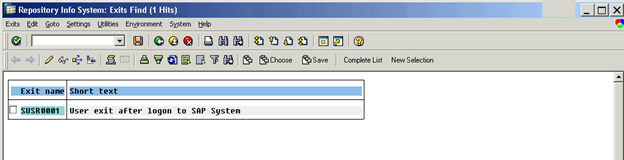
And give the Package name as SUSR and execute it you can see the below component in it:
function_module_info1

Step 2

We have SUSR0001 component. From the description of the component you can make out that this EXIT is called after user log in into SAP system so we can use it for our purpose.

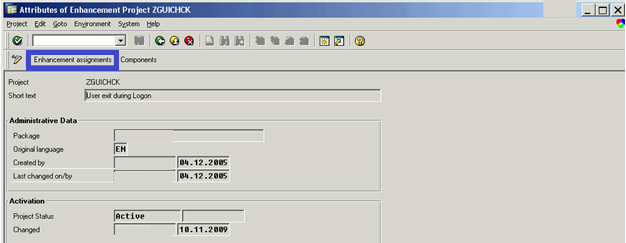
Go to Transaction CMOD and create a Project named ZGUICHCK (you can give any name starting with Z ).
function_module_info2

Step3

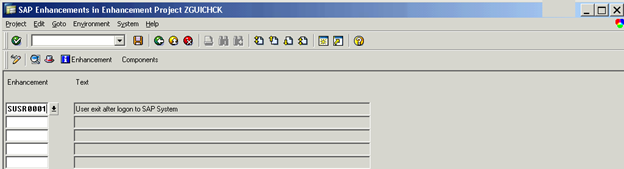
Click on the Enhancement Assignment to include the component into this project. Give our component SUSR0001 and click enter button.
function_module_info3

Go to Components window (It will show all the exits included in this enhancement), in our case only one Function Exit will be shown.

Double click on the Function exit EXIT_SAPLSUSF_001.It will open Function module Editor. Double click on the INCLUDE ZXUSRU01.

Write down your welcome message here. you can use below code :

If sy-uname eq <userid>.
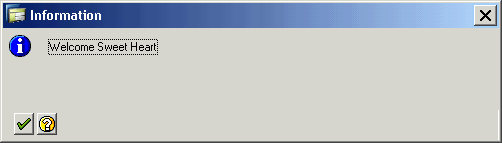
Message ‘Welcome Sweet Heart’ type ‘I’.
Endif.

Now logout and log in again with <userid>. You will get the popup saying
function_module_info4

(Note: Take care that <userid> is not your lady Boss!!!!!!).

Related Posts


Like this post? Share it!

  • Tweet
  • Facebook
  • Diggit
  • Delicious
  • Diggit
  • Diggit
  • Diggit
  • Diggit
  • Diggit

ADVERTISE HERE


User Comments


  1. Nooruddin
    June 22, 2011

    Awesome Presentation….. Really a good one…. I got the clear Idea of using Funtion Module Exits. Thank you very much….. :-P

    Reply


  2. sekar
    February 12, 2012

    This is really a good document where every options are explained clearly.Please continue this good work :)

    Reply


  3. Logeshwari Amavasai
    February 29, 2012

    This article gives clear picture about function module exit and its really informative for new learners,very nice.Keep going good work:)

    Reply


  4. sam
    March 31, 2012

    Hi
    when i give SUSR0001 and click enter button.
    i am getting the following ERROR message.
    SAP enhancement SUSR0001 already belongs to project USRADMIN
    Message no. ENHANCEMENT029
     
     
    regards
    SAM

    Reply


    • Raj
      April 3, 2012

      Hi SAM,

      As it says its already part of USRADMIN.
      so you cant use it.try to use some OSS notes on the same.

      Thanks

      Reply


      • Eshant
        January 12, 2013

        Hi Raj,
        Even I am getting the same thing as SAM. I am not sure how to proceed with this (OSS).
        Please help!!
        Regards,
        Eshant :)

        Reply


  5. sangeetha
    July 6, 2012

    Hi,

    Recently only i visited this site and found very very useful .I implemented the exit EXIT_SAPLSUSF_001 as explained above for my user-id,  activated it and logged off.when i logged in , i didnt get the message. Is this becoz i saved it as local object?Pl clarify..

    Reply


    • Raj
      July 6, 2012

      Hello ,

      Saving as local object does not impact the execution.
      Can you please Check whether
      you have provided the perfect user id ( in caps )
      If sy-uname eq .

      Also Please check the Enhancement is active .

      Get back if i am not clear or it does not work.

      Thanks
      Raj
      SAP IGnite

      Reply


      • sangeetha
        July 17, 2012

        ya u r right, i didnt activate the enhancement , activated only function exit .

        Thanks for your reply.

        Reply


  6. srinivasaraju
    July 27, 2012

    Thankyou where much . I have idea in function exits

    Reply


  7. kabi
    January 22, 2013

    Hi Raj,
    I tried everything as mentioned in the tutorial and activated everything,
    but the message doesnot get displayed after I logged in.
    Pls help

    Reply

Leave a Reply

:wink: :-| :-x :twisted: :) 8-O :( :roll: :-P :oops: :-o :mrgreen: :lol: :idea: :-D :evil: :cry: 8) :arrow: :-? :?: :!:
  Twitter Followers Email Updates