Before we start with this article of how to create a screen EXIT have a look into the below image.
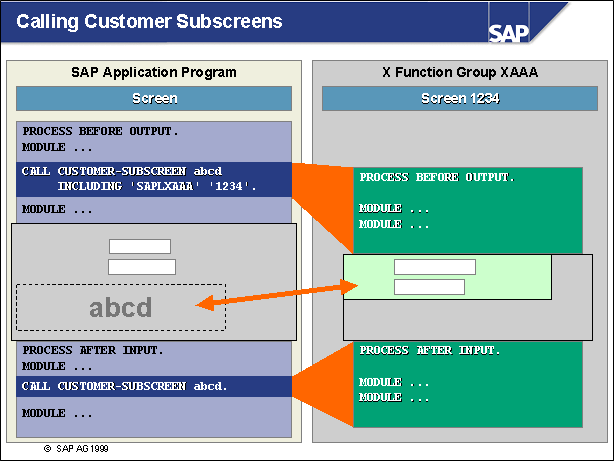
> Whenever the statement CALL CUSTOMER-SUBSCREEN <area> INCLUDING <X-function-pool> <screen_number> occurs at PBO in the flow control of a screen, a subscreen is included in the subscreen area defined by SAP application programmers. At this point, all modules called during the PBO event of the subscreen are also processed.
> The PAI event of a subscreen is processed when the calling screen calls the subscreen during its PAI event using the statement CALL CUSTOMER-SUBSCREEN <area>.
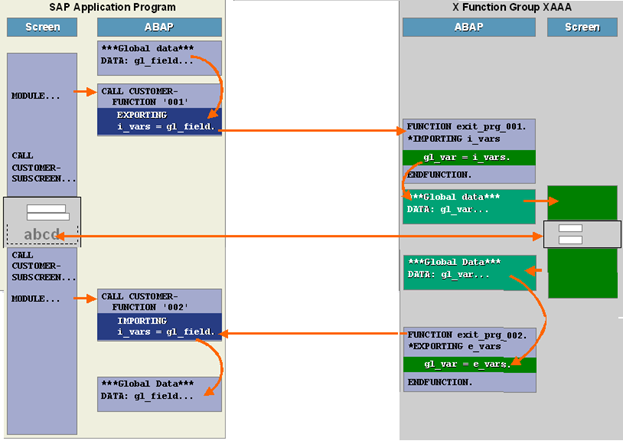
> The global data of the calling program is not known to the X function group that contains your subscreen; SAP application programmers use function module exits to explicitly provide this data to subscreens.
> In order to facilitate data transport, modules are called in the flow control of the calling program that contain function module exits for transferring data via interface parameters.
> Function modules belonging to these kinds of function module exits can be found in the same function groups as their corresponding subscreens.
> Data must be transported in the other direction as well, since global data from the X function group that contains your subscreen is not known to the calling program either. For this reason, SAP application programmers use function module exits to return any data to the calling program that was changed in the subscreen.
> This is done by calling a module during the main screen’s PAI event that contains a function module exit for returning customer data via interface parameters.
So In simple words Screen exit also require Two function module exits to make it to stand properly.
Starting with the Practical:
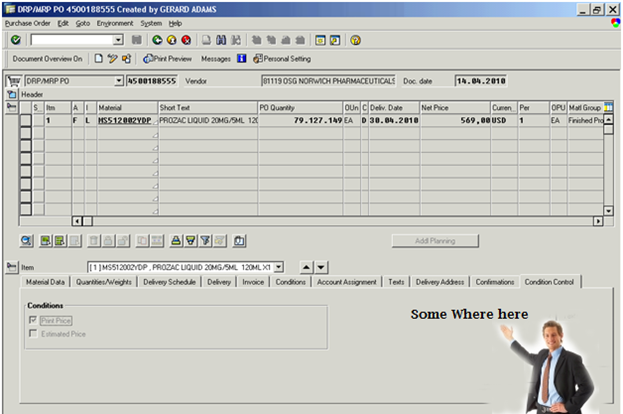
Below is ME22N screen, Now the requirement is to modify it with few extra fields into item level data.
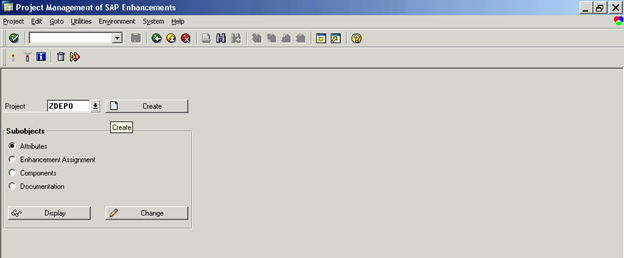
Step 1 :CMOD is the transaction code using which we can use this components
Go to Transaction code CMOD -> Enter the Project name As ZDEPO (you can give any name).
Step 2 :
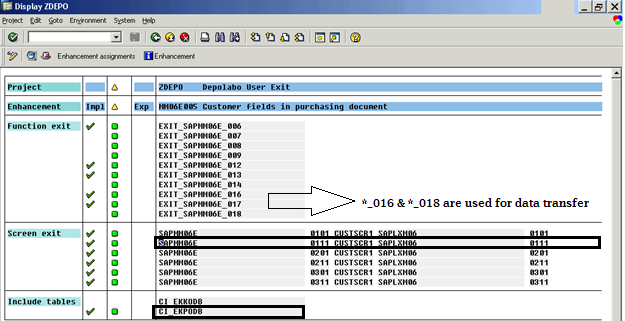
Click on the button Enhancement Assignment
Include this Enhancement MM06E005 (Transaction code SMOD is used to find the proper enhancement needs to be used) Read article Enhancement in SAP to know how to find out appropriate enhancement.
We have already discussed how to find the respective component for your change.
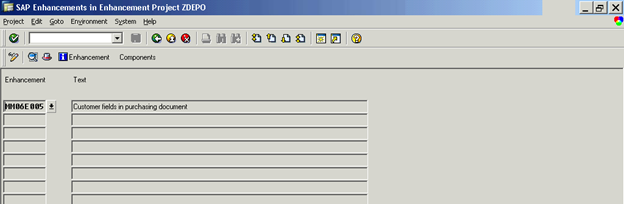
Step 3:
Click on Components Button.
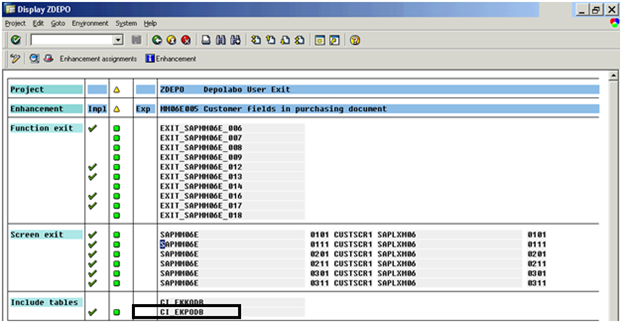
You can see the below components into your Project:
It is having Function EXITs, Screen EXITs and few includes for the table.
As we have discussed you want to Display Extra fields into ME22N screen.
Double click on the CI_EKPODB it will take you to SE11 screen.
Step 4:
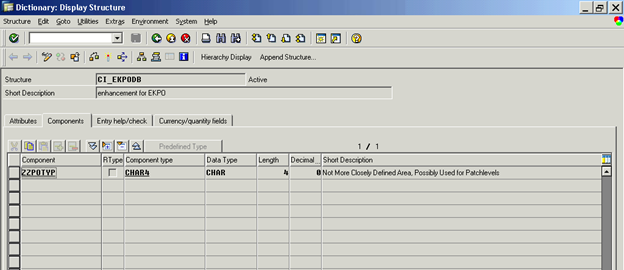
Include the field which you want to Show or enhance.
Here we have used field ZZPOTYP which is of type Char4. Save it and activate it.
(Note: it may take long time to activate as this field will be inserted into EKPO table.)
Step 5:
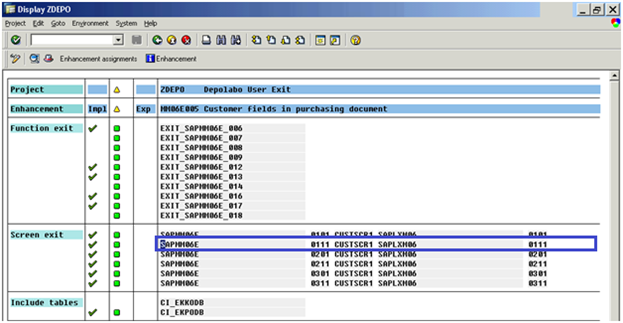
Click on the BACK button and go back to the below screen. Now you can design visual part of your work.
Double click on the Screen EXIT 0111.It will take to you to Screen painter Se51.
Step 6:
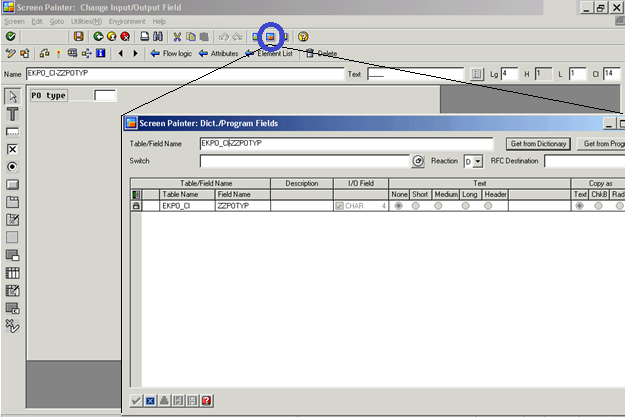
Click on the layout button in the screen. And create label and text field.
Here we are going to insert our created field ZZPOTYP.
Click on the button Dict./Program fields.
Enter the Table/Field name as : EKPO_CI-ZZPOTYP and click Get From Dictionary button.
Select that field and insert it into the screen.
Save your changes and activate this screen.
Step 7: Again go back to the below screen using back button.
Till now we have created a SCREEN. (First image of this article: Calling customer subscreen ).
Now we need to implement Two Function EXIT to transfer data to the sub screen and to read the data from the subscreen .
Here Function EXIT:
EXIT_SAPMM06E_016.–> use to transfer data to the subscreen.
EXIT_SAPMM06E_018.–> use to get the data back from the subscreen.
Double click in the First 016 exit it will take you to the function module , you will find one include
INCLUDE ZXM06U41 .
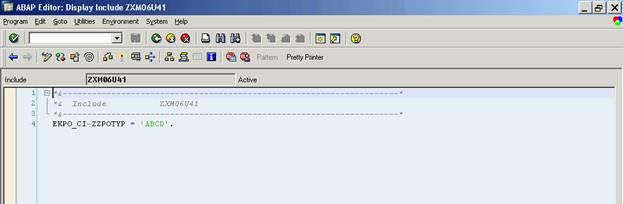
Double click on this include and create it. Put your code to initialize the variable EKPO-ZZPOTYP here.
Step 8:
For learning purpose we have just use a single line of code to make it easy.
EKPO_CI-ZZPOTYP = ‘ABCD’.
Step 9:
Same way you can use the EXIT: EXIT_SAPMM06E_018. For reading the value if use modify it in screen.
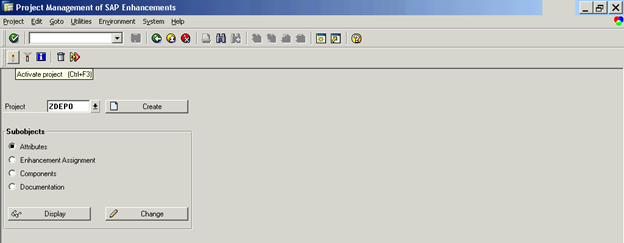
For time being ignore this step. And Go back Again to the CMOD screen and Activate your project ZDEPO.
Step 10:
Go to transaction code ME22N open any existing PO. You can see an extra tab is added into ITEM detail
Customer Data. Which will have your new field ZZPOTYP.
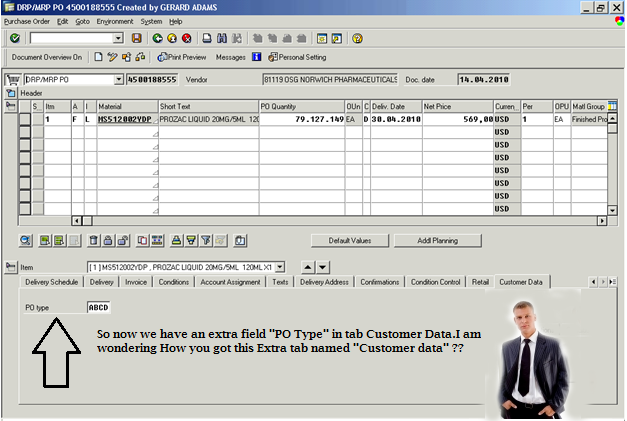
This Extra tab Customer Data is added by standard SAP code. Whenever it finds any active screen exit while execution, it will activate this tab. (Note: screen 0111 which we have used is defined under “Customer Data” tab.)




Raj
Great Work. Please suggest if I can add a field in the table control (item level detail). One example I want to display actual stock before raising a PO for a material.
Please suggest.
Many Thanks
Sam
It doesn’t work for me.
When I want to compile the EXIT_SAPMM06E_016, I’ve got an error : “CI_EKPO” doesn’t exist …
Raj
HI ,
check it out , you might have forgotten to activate the CI_EKPO.
thanks.
Raj
Jen
Do you know if it’s possible to do a screen enhancement to a SAP standard Tx where a BAdI doesn’t exist, e.g. Tx ME11?
Raj
Hell Jen,
Screen Enhancement few less possible ways.
1. Do it with Customer Exit ( no badi requires SMOD / CMOD will handle it )
( Now they are providing the BADIs to do that enehencement)
2. Using configuration , SAP Has provided the Configuration in SPRO to do enhancement in few generic screen.
( id dont think we have any other way to do Enahcement in SAP GUI other thn these methods )
You can navigate to a different screen using implicit enhancement but enhancing will be difficult.
thanks.
Raj
SAP IGnite
Joe McLean
Raj
we have a similar scenario in work orders, with a customer enhancement tab allowing update of a set of fields. There is validation on these fields. Currently, if we generate an error message, the screen fields become non-updateable and the user has to jump out to another tab and then back into the customer tab in order to rerun the PBO. Is there a command we can use to rerun the PBO from inside the subscreen?
Raj
Hello Joe,
Try to implement those validation in
ON INPUT / ON REQUEST . the way it will be use full for your requirement.
In that case focus will be on your field and those fields will be editable for end user.
As such i dont think so we have any command to re run the PBO other thn calling a screen again.
In last if nothing works out try out an Error message in form of popup.once user end the popup
the focus will be on custom field.
Get back if it requires to be discuss .
Thanks
Raj
SAP IGnite
Naresh
Hi Raj
You r Helping a lot to who is new to the ABAP ,Thanks for your support
i want to get the same support From u in future
Thanks in Advance
S.Naresh kumar
Amit Pal
Hi Raj,
Need your help for one issue…
I need to put F4 help on one field which is already available on standard screen. This screen is available as a workitem to the second level approver and the initial workitem is being created by Tcode /n/opt/vim_7ax1 , which triggers the standard VIM workflow.
Thanks in advance…
Amit Pal
Raj
Hi Amit,
Is the mentioned Transaction code is part of the ECC ?
Can you tell me the module u r working on so that i can check out in my system.
Try out following steps :
As u said that you want to put f4 help on a standard field.So assume you dont have any Search help linked with that field.
if its linked thn you can use Search help exit to enhance it as per the requirement.
Try to check if we you have any BADI’s when you press F4 on that field putting break point in get_instance method of the standard class CL_EXITHANDLER.
In other case try to check if any performs are trigger when you press F4 button.if its there..
Write at selectionscreen on value request event there. using implicit enhancement in the starting of that form.
Please get back if this does not work.
Thanks
SAP Ignite.
Raj
Amit Pal
Hello Raj,
Thanks for reply.
This tcode is not the part of ECC but it is part of VIM ( vendor Invoice management) an Open text product which is supported by SAP. This is used for scanning and archiving purpose and is based on ABAP only.
I am working on one of the workflows of this module, and the screen on which i need to put F4 help on one of the field, is available to second level approver as his workitem, and the workitem is being created by Tcode /n/opt/vim_7ax1 , which triggers the standard VIM workflow.
There is no Badi available when i press the F4 button for this field. Badi is available only when user clicks on his SAP mailbox or clicks on the workitem in the SAP mailbox, but these are of no use as for F4 help, data will be picked from table based on the other fields which user will be filling on the same screen just above this field.
Also i checked that when F4 is pressed on this field, code comes to FM HELP_START and then comes back to the screen with the message that no F4 help is available. It is not possible to enhance this FM and gives the message ‘ object is part of the central basis and therefore cannot be enhanced’.
Any help is appreciated.
Thanks in advance.
Amit Pal
Raj
Hi Amit,
I cant see the code as dont have VIM system with me.
Let’s try out few things..
Did you try implicit enhancement in the starting of that HELP_START function module.
if its not allowing to do implicit enhancement try to get a perfom inside the FM , which can be enhance,,
Thanks & Regards,
RAj
SAP Ignite.
vikram
hi
when we use screen exit and add new fields to it for transaction me21n and me22n dese fields are in editable form but me23n is for display how to control those fields so that they cannt be in editable format rather thy be in display mode
Raj
Hi Vikram,
check the Sy-Tcode in the Process Before output and change the property of the fields,
Z fields will be not controlled by the SAP Standard , You need to write code to control
the property of the Z field.
thanks
Raj
SAP Ignite.
vikram
hi
i didnt get you raj, can you explain in detail im new to dis thing
Raj
Hi Vikram ,
The subscreen which you have created for adding the new field.
You need to write a new module in its PBO.
which contains the code like :
if sy-tcode = ‘ME23N’.
LOOP at SCREEN.
if screen-name = “ur_fieldname”.
screen-input = 0.
endif.
MODIFY SCREEN.
ENDLOOP.
endif.
Thanks & Regards,
Raj
SAP IGnite.
vikram
thanx a lot
Kunal
HI Raj ,
I have done the code as you suggested above (loop at screen…)
NOw the problem is when we go to change mode from ME23N then all standard fileds are set to change mode , where as our custom tab fields are in display mode.
Please suggest how to make my custom tab fields to change mode when we select change option from ME23N .
Raj
Hi Kunal,
There are many ways you can do this.
Try to check which user command user performed.Let’s say its EDIT mode.
you can use the same code loop at screen.
and change the screen-active property of the field.
Thanks
~Raj
SAP IGnite.
Rosy
Hi Raj,
Need your help in one issue.I want to implement screen exit for transaction LT12.
User wants to add one field at header level while confirming the TO in LT12. I tried finding the screen exits but couldn’t find any relevant to this.
could you please guide me how to do that?
Thanks in advance
Rosy
vinay
Hi Raj,
I have followed the same steps what you have mentioned in the Document.But here you have hard coded the value in the Function Exit
EKPO_CI-ZZPOTYP = ‘ABCD’.
But i want to pass the data from my screen ,When ever i enter the values in the PO Cutomer Data Screen the data should be updated in the EKPO table.
How to capture the value that we enterd at the screen leavel ,Please advice?
Raj
Hello Vinay,
Is that field is part of EKPO_CI ?? if it is you can very well use it.
Else check the STEP 5. May be another user exit can help you out for your requirement.
I feel there are BADI’s available so try to put a break point in CL_EXITHANDLER class’s GET_INSTANCE method
to search for BADI.
Get back if its not clear.
Thanks
Raj
SAP IGnite
Peter
Hi Raj
Is it possible to Enhance Standard SAP Screens which are not having Screen Exits or BADI??
I searched for enhancing MFBF but I am not able to locate any screen exit and also No suitable BADI’s are there. When I searched the standards screen program for MFBF (i.e. SAPLBARM) I found there are two empty sub screens are there. Kindly let me know for any suitable options for enhancing MFBF Screen.
Thanks
Peter
Jeff
Hi Raj,
In response to your above comment (There are many ways you can do this.
Try to check which user command user performed.Let’s say its EDIT mode.
you can use the same code loop at screen.
and change the screen-active property of the field.), I have a similar issue when using XD03 and a custom subscreen. When the main screen of XD03 is set to edit mode, there doesn’t seem to be any variable available to determine edit vs display mode during the PBO of my custom screen. In this PBO I have the following code ( IF sy-tcode = ‘XD03′.
LOOP AT SCREEN.
screen-input = ‘0′.
MODIFY SCREEN.
ENDLOOP.
ENDIF. ) but this doesn’t work since the edit/display toggle still leaves the sy-tcode as XD03 even when now in edit mode… I only ever get display mode. BUT when going in through XD02 edit mode does work of course. How do I get my subscreen to toggle the edit / display along with the main XD03 screen?
kabi
Hi Raj,
While creating screen exit when I double click on include ZXM06U41, it says program name zx are reserved for the includes of exit function group, pls help.
Raj
Hello Kabi,
Can you check is your exit is activated?
I guess if its activated and you have provided correct user id .it should work.Please get back if its not working.
Thanks
~Raj
SAP IGnite
Jose Luis R.
I need that me23n refresh subscreen when doubleclick on item detail ,so they can view the corresponding item in every tabview
SK
Hi Raj,
I tried replicating program as-is. I was able to modify the screens. However, the PO type field was blank instead of “ABCD” when diplaying or changing PO using ME23n/ME22n.
Could anyone point to the error?
Thanks
SK
Raj
Check Step 5
Make sure ur the project is activated.
if everything is fine and still it does not shows get back..
Thanks
~Raj
SAP IGnite
Jose Luis R.
Hi Raj,
I need that me23n refresh subscreen when doubleclick on item detail ,so they can view the corresponding item in every tabview or subscreen .
Do you have any idea about it ?
screen enhancement without BADI & EXITS
Hi Raj,
for a given transaction if there is no BADI and user exit involved, how to do the screen enhancements.
regards,
Suman.
Raj
Hi Suman,
You can request SAP to provide one in case if it makes business useful case.Most of the time they have provided all the places were needed.Check out the customizing options in SPRO for your module it should be there.
If nothing works out try with Implicit enhancement with totally new screen flow as per your requirement or you can go with custom development copying standard and reusing existing code.
Thanks
~Raj
SAP IGnite
Manasa
Hi Raj,
I need an F4 help for an existing field in a the standard transaction. How can I achieve this. Please help.
Thanks & Regards,
Manasa