A user exit is a place in a software program where a customer can arrange for their own tailor-made code. SD module has a large number of User exit available.
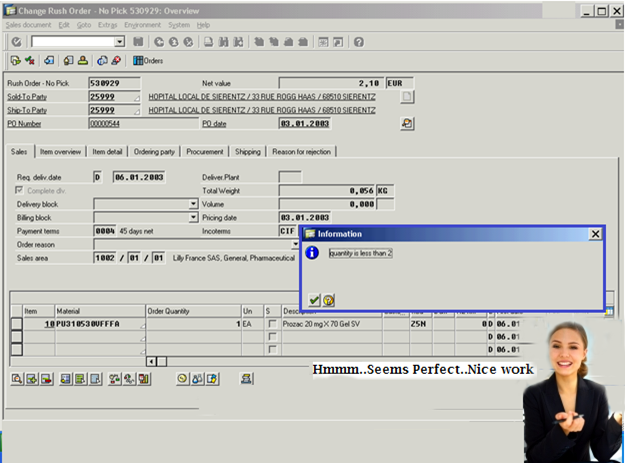
The below is the create/ change sales order screen (VA01/VA02).
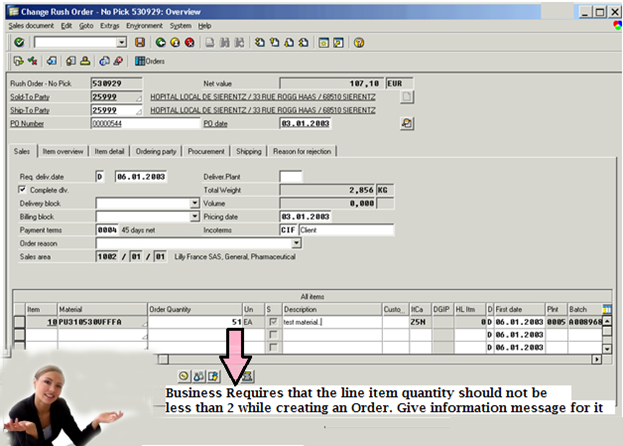
The requirement is to put the validation to the line items such that the quantity field for the line item should not be less than 2 units.
Step 1: How to find the appropriate USER EXIT.
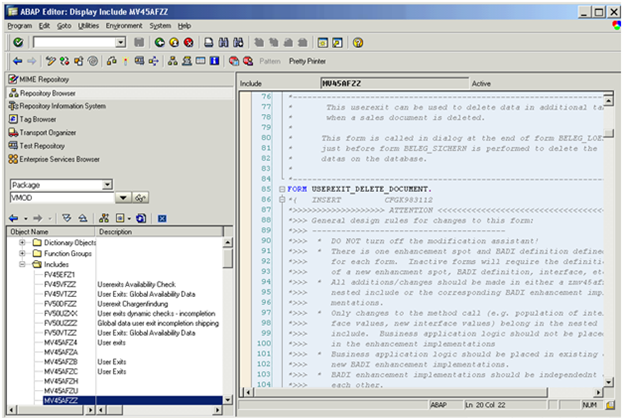
Go to object navigator(SE80) and select package from the list and enter VMOD in it. All of the userexits in SD are contained in the development class VMOD. Press enter and you will find all includes which contain userexits in SD for different functions like PRICING, ORDER PROCESSING etc. Select the userexit according to the requirement and read the comment inserted in it and start coding .
There is a lot of confusion in using USER EXIT, like do we need access key to modify the USER EXIT ?.
The answer is Yes as well as NO.
If you see the include MV45AFZZ.we have many FORMS and ENDFORMS init which is in custom name space. So we don’t need key to modify it. Check out the below screen shot.
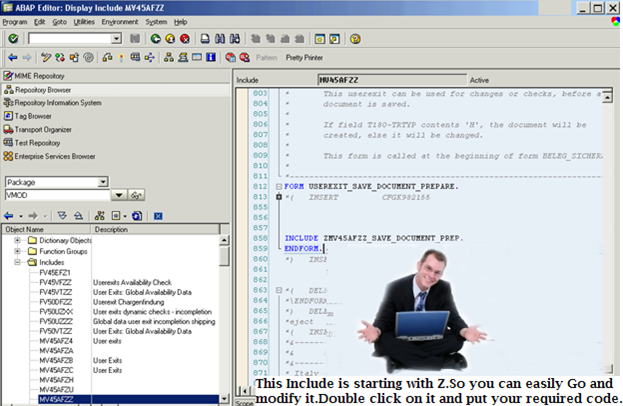
So open that include and write your logic in ZMV45AFZZ_SAVE_DOCUMENT_PREP.
While some EXITs like MV50AFZ1. You need an access key to modify it Don’t get puzzled, this is how SAP has given J.
Step 2:
So we got our USEREXIT ZMV45AFZZ_SAVE_DOCUMENT_PREP. Open it and put the below code inside it.
data: lv_flag(1) type c.* exit if not SAVE
if sy-ucomm ne ‘SICH’.
leave to screen sy-dynnr.
endif.
* check line items
clear lv_flag.
loop at xvbap where updkz ne ‘D’.
* This checks for quantity less than 2
* As xvbap-kwmeng is pack with 3 decimal we are comparing with 2000
if xvbap-kwmeng < 2000.
message i000(fb) with ‘quantity is less than 2′.
lv_flag = ‘X’.
clear sy-ucomm.
exit.
endif.
endloop.
if lv_flag = ‘X’.
leave to screen sy-dynnr.
endif.


Yogesh Patil
Hi,
I found all documents well documented and special thing about these documents are self explainatory,User friendly…Good Job
Keep it up Guys…
Nazi
Hi
when i tried to implement this in my IDES( in include MV45AFZZ), it is asking for the access key.Can you guide me ,please.
Regards,
Nazi,HOCL.
admin
Hi Nazi,
You don’t have ABAP access in SAP Ides. Please use MiniSAP for doing ABAP Program.
Cheers
Raj
Hi Nazi,
You might have tried to modify the include MV45AFZZ.
You need to double click on the PERFROM and u need to modify that include starting with “Z”.
Thanks,
SAP IGnite.
Carajean
Boy that raelly helps me the heck out.
somnath
hi,
What is the Package for MM01/MM02 like VMOD for sales related
Regards,
Somnath
Raj
Hi Somnath ,
Which kind of enhancement you are looking for ?
the package for the MM01 is MG.
thanks & regards,
~Raj
srikanth
Hi Raj,
could please you tell me default package for QM module in sap.
Waiting for your reply, & Thanks in advance.
Thanks & Regards
srikanth
Raj
Hello Srikanth,
The Default package is QM it self.
tell me which business application you are looking for will tell you the package in which it belongs to.
Thanks
~Raj
Shalini
Hi ,
Do we need access key only first time while changing in MV45AFZZ or MV50AFZ1 or everytime we write in form endform it will ask for access key??
i tried to write code in MV50AFZ1 in FORM userexit_refresh_document , i created ENHANCEMENT it does’nt ask for the key.
i am quite confused related to how to write code in that form endform and when it will ask for key.
plz help…
thx in advance
shalini
Raj
Hello Shalini,
Once you applied the Access key you need not to enter it again and again.
For the First time whenever you enter the key it gets stored in the DB table ADIRAKEY (**not 100% sure abt table name)
And that particular object will be allowed for the future changes.
You can directly write your code inside the form – Endform
As an Example :
FORM USEREXIT_SAVE_DOC_BEFORE_PREP.
*{ INSERT WDVK900314 1
DATA : li_old_xlips like line of xlips occurs 0 with header line.
DATA : li_xvbfa like line of xvbfa occurs 0 with header line.
Perform MV50AFZ1_ZWM03.
PERFORM MV50AFZ1_ZWM01.
*** Perlu dilakukan karena proses split.
IF T180-TRTYP = ‘H’ and CVBAK-VKORG = ‘A201′ and CVBAP-WERKS = ‘2012′
and CVBAK-VTWEG ne ‘07′ and CVBAK-VBTYP = ‘C’.
*** For Plant 2012 Re-arrange table xlips xvbup and xvbfa here ****
****>>> SY SYARIEN <<<>>> END OF ENHANCEMENT >>>>>****************
ENDFORM.
Get back if its not clear.
Thanks & regards,
~Raj
Shalini
Thanks Raj
Shalini
Thanks Raj
Shalini
Hi Everyone,
I want to learn workflow , does anybody have real-time scenario of workflow along with proper screen shot.
Thanks in advance
Shalini
Tripti
Superb work Raj!
Pls do keep posting new articles covering various topics of SAP ABAP..
One question – Could you pls throw more light on – How to find User Exit for SD?
Using SE80 with VMOD as package name, it gives many exits . So, its difficult to analyse each and find out which is suitable to my requirement?
Any tip in this search?
Raj
Hi Tripti ,
As we don’t have proper documentation of all the available user exits.The only way is either go via description or search on SDN for the same.
Let me know if you need details regarding a particular transaction code or an application.
Thanks
~Raj
SAP IGnite
Sivakumar V
Raj,
Doing great! Many Thanks for your service!
Xavier
loop at xvbap where updkz ne ‘D’.
why updkz ne ‘D’ ? pls tell me whats that field ‘updkz’ …